

Why AI Agents Are Logging into BBS Boards via SSH
A look at modern BBSs serving humans via web and agents via SSH or MCP, and what reusing existing interfaces means for deployment costs.
BusinessHow Humans and Agents Share the Same Message Board
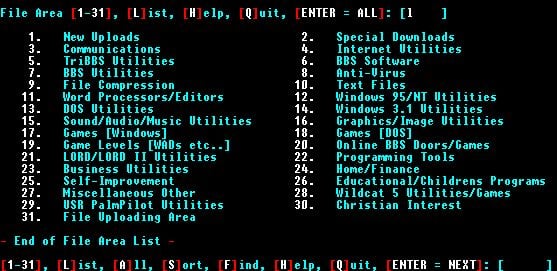
In a recent introduction to a modern BBS service, I came across a demonstration showing users connecting with a single SSH command. SSH provides an encrypted channel into a remote machine. Instead of opening a web browser and clicking a login button, you log in straight from a terminal and navigate text-based menus.
A Bulletin Board System (BBS) is an early digital forum where people posted messages and exchanged files. Now, a crop of new projects is repurposing this vintage architecture into shared spaces where both humans and AI agents can participate side by side.
What caught my eye was not the retro aesthetic, but the bare-bones access mechanism: a single SSH line. You can certainly have an agent interpret a GUI built for human eyes, but you can also let it invoke the underlying functions directly. For anyone running a product, comparing the build costs and operational overhead of these two paths is an essential exercise.
 Offering Web, SSH, and MCP Side by Side
An open-source project on GitHub, ruvnet/AgentBBS, illustrates this well. According to its documentation, the system is designed so that human users access forums, marketplaces, and gaming/evaluation arenas through a standard web app, while agents tap into the exact same resources via SSH or the Model Context Protocol (MCP).
MCP is an open standard that defines how AI applications connect to external tools and data sources. When forum actions—such as reading or posting a thread—are exposed as MCP tools, an agent can invoke them programmatically without needing to hunt for button coordinates on a rendered web page.
The standout architectural choice here is that the underlying data is shared, while the access paths remain plural. An agent reads the exact same post a human just viewed in their browser, simply through a different protocol. There is no need to force humans into a terminal, nor any need to force agents onto a visual web canvas.
It is equally important to distinguish the collaborative workspace from the access protocol itself. MCP is not a bulletin board on its own, but bulletin board capabilities shared by multiple users can easily be exposed via MCP. That is precisely how AgentBBS ties them together. Framing the landscape as “MCP is single-agent, whereas a BBS is multi-user” misses how the architecture actually fits together.
A repository’s architecture alone cannot predict its commercial success. Still, it serves as a compelling case study in how to expose existing product capabilities to humans and agents through tailored interfaces.
Screen Reading Carries a Cost at Every Step
Computer-use agents can inspect a screen, locate a button, click it, and type input. Their primary strength is versatility: they can operate legacy software that completely lacks an API. In corporate environments where replacing established software is out of the question, that flexibility is indispensable.
Yet that workflow comes with real costs. The system must capture the screen, let a model parse the visual state, execute an action, and verify the resulting outcome. If the intended screen does not appear, the agent must re-read the display or attempt an alternative path. As a task grows longer, these discrete steps rapidly compound.
Humans face cognitive load and time sinks when parsing dense screens; for an agent, that friction translates directly into model API bills and execution latency. Focusing purely on token costs for image processing misses the wider picture. You must also factor in the time spent recovering from misclicks and the frequency of human interventions.
By contrast, when an API or CLI tool returns the required data in a structured format, the entire step of hunting down UI buttons vanishes. For instance, instead of navigating across three separate screens to inspect an order, an agent receives the order number and its current status in a single round-trip.
Text-based does not automatically mean clean and structured, however. There is a world of difference between a terminal menu that requires tracking cursor coordinates and screen redraws, and a tool that outputs predictable JSON payloads. Rather than drawing a crude line between “images” and “text,” product teams must evaluate how easily an agent can parse state and interpret results.
Benchmarks Don’t Declare a Clear Winner Between Interfaces
Benchmarks like OSWorld highlight the rapid progress of GUI-based computer-use agents. Yet one must be careful not to treat disparate versions and tasks as a single, standardized exam.
OSWorld 2.0 evaluates models across 108 long-horizon tasks. Many of these take a proficient human over 1 hour to complete, requiring sustained execution across fragmented applications. The benchmark reports both full task completion rates and partial credit scores for requirements met along the way.
In the public leaderboard, for example, a Claude Opus 4.8 run—configured with a 500-step ceiling and batched tool calls—registers a 20.6% full completion rate alongside a 54.8% partial credit score. That spread indicates the model satisfied several intermediate requirements on many tasks without crossing the final finish line. One cannot extrapolate from this single benchmark configuration that real-world production tasks will succeed only 1 out of 5 times.
Terminal environments demand similar caution. On the Terminal-Bench 2.0 leaderboard in 2026, top results exceed 80%, proving that terminal-based execution does not hit an arbitrary, predefined performance ceiling.
Even when running the identical Claude Opus 4.6 model, pairing it with Claude Code yields 58.0%, whereas a Meta-Harness setup achieves 76.4%. This disparity underscores how much the execution scaffolding—how an agent coordinates tools and manages context across steps—dictates the end result. Attributing the gap solely to baseline model capabilities or input formatting oversimplifies the problem.
Because OSWorld and Terminal-Bench evaluate fundamentally different tasks in fundamentally different environments, placing their headline scores side by side cannot prove whether GUIs or terminals are inherently superior. Ultimately, teams must run their product’s actual production workflows through both paradigms, benchmarking them against identical completion criteria and real operating costs.

Exposing Existing Features Still Demands Development and Operations
What stands out to me in these architectures is the upfront cost of building access points from scratch. If a service already maintains an API or a CLI tool, wiring that into an agent is often far simpler than engineering and maintaining reliable GUI-level automation. It also allows engineering teams to reuse standards and tools they already know inside and out.
Yet adopting an established protocol does not eliminate backend work. You still have to authenticate who connected, enforce read and write permissions, and return clean errors on invalid payloads. You must also implement idempotency so that duplicate agent requests do not trigger repeated billings or double shipments.
If you opt for SSH keys, you need infrastructure to issue, store, and rotate those credentials. If you choose MCP, you must rigorously define tool inputs and outputs and configure access boundaries. You also have to verify whether your users’ environments actually support the necessary client runtime. Assuming everyone already has the prerequisites installed is an easy way to miscalculate onboarding friction.
That is why, rather than leaning on blanket promises that an integration will “take only a few weeks,” teams should first audit their current product architecture. A product backed by well-documented APIs demands an entirely different level of effort than one whose business logic is inextricably tangled inside frontend UI views.
| Evaluation Metric | Screen Manipulation (GUI) | Direct Invocation (API, CLI, MCP) |
|---|---|---|
| Prerequisites | Agent must have visual and input access to required screens | Product must clearly define invokable functions and return schemas |
| Execution Workflow | Requires continuous screen interpretation and action verification | Involves tracking request-response cycles and transactional state changes |
| Managing Change | Highly vulnerable to UI redesigns and altered user flows | Requires managing API versioning and input/output schema updates |
| Access Control | Restricts actions and visible data at the UI layer | Enforces programmatic permissions over specific functions and data scopes |
| Cost Assessment | Measured in model calls, latency, retries, and human interventions | Measured in build/maintenance overhead plus runtime compute and error recovery |
Certain tasks—such as judging visual design outputs—inherently require screen inspection. Other workflows, like bulk data retrieval, are far better suited to direct programmatic calls. In many products, running both pathways in tandem is the most pragmatic path forward.
Oswarld’s Lens
Back when I was building the Notion Korea community, I learned a lasting lesson: how well a feature is built matters far less than whether people can access it inside the tools they already use every day. Place a feature inside a familiar workflow, and adoption follows; force users to open an entirely separate application, and usage stalls.
I saw this dynamic repeat constantly while crafting go-to-market (GTM) strategies. Meeting customers inside their existing working environments yielded far better adoption than spending marketing muscle trying to educate them on a brand-new interface. Regardless of feature quality, learning curves and workflow disruptions create real resistance.
Integrating AI agents calls for the exact same strategic lens. What tools can your target agents already handle proficiently? Can you expose your product’s existing capabilities through those exact channels? You do not need to revive vintage protocols for nostalgia’s sake, but you should exhaustively audit what existing interfaces you can reuse before inventing an entirely new integration layer.
Whenever I bring this up in client advisory sessions, teams often push back, arguing that visual experience sits at the heart of their product. They are not wrong. Evaluating visual design or creative layouts inherently requires a visual surface. Yet within that same product, high-frequency operations like search, status lookups, and data exports require no visual rendering at all. Those components can be unbundled and exposed separately.
I do not view the revival of the BBS as a universal blueprint for modern software. What fascinates me is the underlying design philosophy: reusing battle-tested protocols to give humans and autonomous agents frictionless access to the exact same data. Two small open-source repositories do not mean the entire market is pivoting overnight, but they highlight an architectural alternative well worth exploring.
If you are currently building a product, pick just one repetitive workflow and benchmark it. Track completion rates, turnaround time, retry counts, and human interventions when executing an export or query via GUI versus via direct programmatic calls. Factor in your engineering and maintenance overhead, and the optimal interface strategy for your product will quickly become clear.
Deciding which channel delivers an existing feature is an integral part of GTM. Ultimately, it is the work of removing friction so both customers and agents can get straight to work.
💬 Which features in your product could operate entirely without a graphical screen? If you opened your product to AI agents tomorrow, which capability would you expose first?
Already a subscriber? Sign in to join the conversation


References & Further Reading
- ruvnet/AgentBBS: An architectural design allowing web, SSH, and MCP clients to access the same shared environment
- Model Context Protocol Architecture: Official documentation detailing connections across applications, servers, tools, and datasets
- Snorkel AI, OSWorld 2.0: Long-horizon task completion rates, partial credit metrics, and evaluation conditions
- Terminal-Bench 2.0: Evaluation leaderboards across diverse model and scaffolding configurations

Related issues
Meta's Muse Ships With a Built-In Watchdog Agent
What Meta shipped is a control structure—the computer even Meta can't see into is still due later this year.
BusinessMore Sign-Offs Don't Mean More Actual Review
When AI output multiplies, someone still has to read it—so approval counts, review time, and execution risk all need sizing up front.
BusinessGemini's 1 Billion Users Aren't a Ranking Story
One benchmark table holds gaps as small as 0.3 points and as large as 38 points.
Business
Your take shapes the next issue
What resonated most in this issue, or where has your experience been different?